.avif)




Pourquoi la fiche GMB est devenue le meilleur levier d'un office en 2026
La fiche Google My Business (officiellement Google Business Profile depuis 2022, mais tout le monde continue de dire GMB) est probablement le canal d'acquisition le plus rentable dont dispose un office notarial. C'est aussi celui que la plupart des études laissent en friche. Tapez "notaire succession Rennes" et regardez ce qui s'affiche en premier : un bloc avec une carte et trois offices. Ce bloc, c'est le Local Pack, et il capte la majorité des clics avant même que l'internaute descende vers les résultats classiques.
Pour un notaire, ce point est encore plus décisif que pour un avocat. Le client d'un office ne cherche presque jamais un nom, il cherche une profession et une ville. Succession, vente immobilière, donation, PACS, contrat de mariage : dans la quasi-totalité des cas, la recherche commence par une intention locale. Pas de fiche tenue, pas d'existence sur ces requêtes.
Et le sujet prend de la valeur, pas l'inverse : avec les résumés générés par IA dans Google et la montée de ChatGPT ou Perplexity comme portes d'entrée, une fiche bien tenue pèse aussi sur la façon dont ces modèles citent ou non votre office. On y revient plus bas.
Avant la technique : ce que la déontologie autorise vraiment
Impossible de traiter ce sujet comme pour un avocat ou un expert-comptable. Le notaire est officier public, et le code de déontologie issu du décret du 28 décembre 2023 pose un cadre net : la publicité à caractère personnel reste interdite, la sollicitation personnalisée et l'offre de services en ligne sont autorisées dès lors qu'elles délivrent une information utile et sincère, avec discrétion, sans porter atteinte à la dignité de la profession.
Traduit en pratique sur une fiche Google, cela donne une frontière assez lisible.
| Ce que vous pouvez faire | Ce qui vous expose |
|---|---|
| Renseigner l'identité complète de l'office : nom, adresse, téléphone, horaires, site | Ajouter dans le nom de la fiche des mentions commerciales ou comparatives ("le meilleur", "le moins cher") |
| Décrire vos domaines d'intervention de façon factuelle (succession, immobilier, famille, entreprise, rural) | Formuler des promesses de résultat ou des affirmations qualitatives invérifiables |
| Publier des photos de l'office, de l'équipe, des locaux | Toute démarche à caractère publicitaire destinée à proposer vos services à des tiers |
| Publier des posts d'information juridique (réforme, délais, pièces à fournir) | Le contenu promotionnel déguisé en information, le ton commercial |
| Répondre aux avis reçus, avec sobriété et sans jamais évoquer un dossier | Organiser une campagne de collecte d'avis, a fortiori avec contrepartie |
Deux réflexes à garder. D'abord, les chambres exercent un contrôle sur la communication en ligne des offices, parfois en amont de la mise en ligne. Si vous refondez votre site ou votre présence Google, un passage par votre chambre départementale coûte un mail et évite un retour en arrière. Ensuite, en cas de doute sur une formulation, appliquez le test le plus simple : est-ce que cette phrase informe, ou est-ce qu'elle vend ? Si elle vend, réécrivez-la.
Bonne nouvelle : rien dans ce cadre n'interdit une fiche complète, exacte et bien renseignée. Or c'est exactement ce que Google récompense.
Être 1er sur Google Maps : le terrain du référencement local
Il ne s'agit pas ici d'être le premier site internet sur Google et d'optimiser votre SEO classique. Il s'agit d'optimiser votre référencement local, c'est-à-dire votre fiche Google Business Profile, référencée sur Google Maps.
Google Business Profile est un levier particulièrement efficace pour les professions réglementées, et encore plus en région, où la concurrence est plus faible que sur Paris ou Lyon.
Mais même en zone dense, vous avez votre carte à jouer. Ci-dessous, deux recherches : "notaire Paris" et "notaire dans ma ville". Trois choses sautent aux yeux :
- Les offices bien classés ont un nom lisible et une fiche complète, pas un intitulé administratif illisible.
- Hors des grandes villes, la concurrence est faible : un office avec quelques dizaines d'avis surperforme largement ses voisins.
- Il reste tout à fait possible d'être visible sur Paris, à condition de travailler la fiche plutôt que de la laisser vivre seule.


Le triptyque que Google utilise pour vous classer
Avant de toucher à votre fiche, comprenez comment Google range les offices dans le Local Pack. Trois critères, et un seul vous échappe vraiment.
| Critère | Ce que Google regarde | Votre marge de manoeuvre |
|---|---|---|
| Proximité | La distance entre l'internaute et l'adresse de l'office au moment de la recherche | Quasi nulle. L'adresse est figée et ne se négocie pas |
| Pertinence | Catégorie principale, catégories secondaires, services renseignés, nom de l'office, cohérence avec le site | Forte. C'est du paramétrage, réalisable en une après-midi |
| Notoriété | Volume et fraîcheur des avis, ancienneté de la fiche, mentions externes, liens vers le site | Forte mais lente. C'est le critère le plus puissant sur la durée |
Concrètement : un office à 1 km avec 70 avis à 4,7 passe devant un office à 300 mètres avec 9 avis à 5,0. Google préfère la preuve d'activité au mètre de proximité. C'est précisément la brèche dans laquelle un office bien tenu peut s'engouffrer, y compris face à une étude historique installée depuis quarante ans mais absente du web.
EEAT et YMYL : pourquoi le notariat est doublement concerné
Rappel pour ceux qui n'ont pas suivi : Google évalue les contenus selon quatre piliers, l'EEAT (Experience, Expertise, Authoritativeness, Trustworthiness). Pour les sujets dits YMYL, "Your Money or Your Life", ces critères pèsent beaucoup plus lourd. Succession, donation, achat immobilier, régime matrimonial : vous êtes en plein dedans, sur les deux jambes à la fois, le patrimoine et la vie familiale.
Ce que peu d'offices ont vu, c'est que la fiche GMB est probablement leur meilleur actif EEAT.
- Experience. Les avis clients sont de l'expérience vécue, racontée par des tiers. Les photos des locaux, de l'équipe, de la salle de signature ajoutent une preuve d'activité réelle que le site seul n'apporte pas.
- Expertise. Catégorie principale et catégories secondaires déclarent officiellement vos domaines. Si elles s'alignent avec les pages de votre site, Google comprend où vous êtes compétent.
- Authoritativeness. Ancienneté de la fiche, volume d'avis, régularité. Une fiche vivante depuis cinq ans dit à Google que l'office est une référence installée sur sa zone. Les citations externes (annuaire des notaires de France, presse locale, immobilier.notaires.fr) renforcent cette autorité par recoupement.
- Trustworthiness. Le pilier le plus lourd en YMYL. Adresse physique vérifiée par Google, horaires exacts, téléphone qui répond, réponses aux avis. Un office qui répond posément à un avis 2 étoiles inspire plus confiance qu'un office affichant vingt 5 étoiles sans une seule réponse.
Un point technique utile : depuis 2018, Google raisonne par entités, pas seulement par mots-clés. Votre fiche est l'ancrage principal de l'entité "Office notarial X" dans le Knowledge Graph. Site, fiche, annuaire officiel, profils LinkedIn des notaires associés : tout ce qui converge vers cette entité la consolide. À l'inverse, une fiche vide ou en contradiction avec le site fragilise l'ensemble.
L'ère de l'IA : pourquoi votre fiche compte aussi pour ChatGPT
Là où cela devient intéressant : avec les résumés générés par IA en haut des résultats Google, et avec ChatGPT, Perplexity, Claude ou Gemini devenus des points d'entrée à part entière, la question "quel notaire pour ma succession à Nantes" passe de plus en plus par un modèle de langage plutôt que par une recherche classique.
Comment ces modèles décident qui mentionner ? En s'appuyant sur des données structurées et vérifiables : fiches Google Business Profile, annuaires officiels de la profession, presse, entités déjà établies dans le Knowledge Graph. Soit exactement ce qu'une fiche bien tenue alimente.
Conséquence directe : sans fiche complète, sans avis détaillés, sans présence sur les annuaires de la profession, vous n'existez pas dans cette conversation. Vos confrères y sont, eux. Et l'internaute ne passera jamais par Google ensuite pour comparer. Le match se joue de plus en plus en amont.
Autre évolution à surveiller : Google génère des synthèses d'avis directement sous certaines fiches ("les clients apprécient la clarté des explications et la réactivité de l'équipe"). Ces synthèses sont produites à partir de vos avis. Plus ils sont nombreux et détaillés, plus la synthèse affichée est convaincante. Encore faut-il avoir nourri la machine.
Place à la pratique
Commencez par identifier les requêtes réellement tapées, avec Google Trends.
Vous pouvez comparer deux formulations et vous positionner sur celle qui pèse. Ici, notaire Paris est bien plus recherché que notaire dans ma ville. Le réflexe est le même pour vos domaines : "notaire succession" écrase très largement "règlement de succession notaire".

1. Le nom de la fiche
Le nom doit rester le nom réel de l'office. Pas d'accumulation de mots-clés : Google l'interdit techniquement, et la déontologie encore plus. En revanche, un intitulé lisible fait toute la différence. "SCP Martin, Dubois et associés, notaires à Angers" est clair, exact et compréhensible. "SCP M. D. & A." ne dit rien à personne, ni à un client, ni à un algorithme.
2. Les catégories
C'est le réglage le plus rentable et le plus souvent bâclé. Google donne beaucoup plus de poids à la catégorie principale qu'aux secondaires.
| Type | À renseigner | Pourquoi |
|---|---|---|
| Catégorie principale | Notaire | C'est la requête socle. Elle vous fait apparaître sur "notaire + ville", qui représente l'essentiel du volume |
| Catégorie secondaire | Agence immobilière | Uniquement si l'office a un service négociation. Ouvre une visibilité sur un marché où les offices sont largement sous-représentés |
| Catégorie secondaire | Cabinet de conseil juridique | Utile pour capter les recherches de conseil patrimonial et d'accompagnement d'entreprise |
| Catégorie secondaire | Service de planification successorale | Cible directement le premier motif de contact d'un office |
Regardez ce que déclarent les trois offices déjà présents dans le Local Pack sur votre ville. Vous verrez souvent qu'ils n'ont renseigné qu'une seule catégorie. C'est votre ouverture.
3. Les services
Listez chaque prestation avec une description courte et factuelle : succession et règlement de patrimoine, vente et achat immobilier, donation et donation-partage, contrat de mariage et PACS, cession de fonds de commerce, droit rural, accompagnement des entreprises. Une ligne par service, formulée avec les mots du client, pas avec ceux du Code civil.
4. Les photos
Façade, accueil, salle de signature, équipe, parking si vous en avez un. Google favorise les fiches actives : mieux vaut deux ou trois photos par mois qu'une vague de trente d'un coup suivie de dix-huit mois de silence. Sur ce point les offices sont très en retard, ce qui en fait un différenciateur facile.
5. Les horaires et les périodes de fermeture
Détail sous-estimé : Google mesure les fiches sur lesquelles l'internaute revient en arrière parce que l'information était fausse. Renseignez les fermetures d'été et les jours fériés. Un office affiché ouvert un 15 août dégrade son propre signal.
Le cas des offices multi-sites et multi-notaires
C'est la particularité qui distingue vraiment le notariat des autres professions réglementées, et la source d'erreur numéro un.
Beaucoup d'offices exercent sur plusieurs bureaux, parfois dans plusieurs communes, avec plusieurs notaires associés. Résultat classique : quatre ou cinq fiches Google se sont créées au fil des années, certaines revendiquées, d'autres non, chacune avec deux ou trois avis. Votre notoriété est diluée sur cinq entités faibles au lieu d'être concentrée sur une forte.
La règle de tri est simple.
- Une fiche par lieu physique où des clients sont reçus. Un bureau annexe ouvert deux jours par semaine avec une adresse et un téléphone propres mérite sa fiche, avec ses horaires réels.
- Pas de fiche par notaire associé. Un notaire n'est pas un établissement. Ces fiches individuelles cannibalisent celle de l'office et se font régulièrement suspendre.
- Réclamez et fusionnez les fiches fantômes. Une fiche créée automatiquement par Google ou par un ancien associé se revendique depuis le tableau de bord, puis se fusionne avec la fiche principale. Les avis sont conservés.
- Différenciez les fiches multi-sites. Deux fiches strictement identiques à 8 km l'une de l'autre se neutralisent. Photos différentes, description différente, services réellement proposés sur place.
Un audit de dix minutes suffit : cherchez le nom de votre office sur Google Maps, puis le nom de chaque associé, puis l'adresse de chaque bureau. Vous allez trouver des choses.
Les avis : ce que vous pouvez faire sans sortir du cadre
C'est le point où l'article destiné aux avocats ne se transpose pas. Un avocat peut organiser une collecte d'avis. Un notaire, officier public, se trouve sur un terrain nettement plus étroit : le code de déontologie proscrit toute démarche à caractère publicitaire visant à proposer ses services, et une campagne structurée de sollicitation d'avis peut être analysée comme telle. Il n'existe pas de position publique parfaitement tranchée sur le sujet, ce qui invite à la prudence plutôt qu'à l'audace.
Ce qui reste solide, et déjà très efficace :
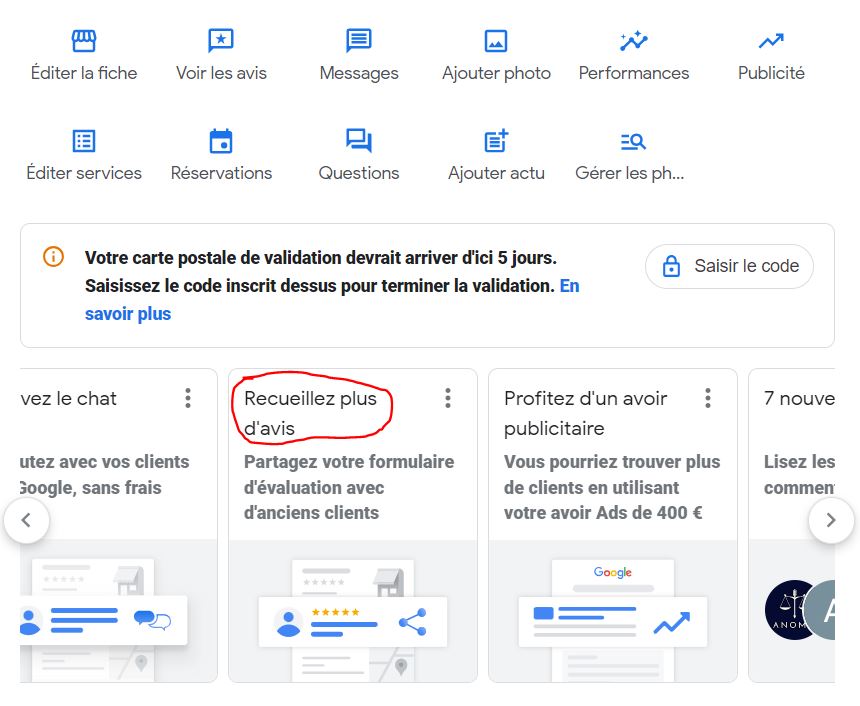
- Rendre l'avis possible plutôt que le provoquer. Le lien court de votre fiche (format g.page/r/...) se génère depuis le tableau de bord Google Business Profile. Placé en pied de signature mail ou sur le mail de clôture de dossier, il informe sans solliciter.
- Répondre à 100 % des avis. C'est un signal fort pour Google, et cela ne pose aucune difficulté déontologique tant que la réponse reste sobre.
- Ne jamais commenter un dossier. Le secret professionnel s'applique intégralement dans une réponse publique, y compris pour se défendre. Une réponse type : "Madame, nous prenons votre retour au sérieux. Tenus au secret professionnel, nous ne pouvons pas évoquer ici le détail d'un dossier, mais nous restons à votre disposition pour en échanger directement au [téléphone]." Sobre, correcte, et lue comme telle par Google comme par les futurs clients.
- Aucune contrepartie, jamais. Cadeau, remise, geste commercial contre un avis : interdit par Google, incompatible avec la déontologie, et détecté de mieux en mieux. La sanction est la suspension de la fiche, avec des années d'historique perdues.
En cas de doute sur votre pratique, votre chambre départementale est l'interlocuteur pertinent. La réponse arrive vite et vaut mieux qu'une interprétation maison.
Les erreurs qui plombent une fiche
| Erreur | Effet | Correctif |
|---|---|---|
| NAP incohérent (nom, adresse, téléphone) | Google soupçonne plusieurs entités et dilue votre autorité | Alignez au caractère près fiche, site, annuaire des notaires et mentions légales |
| Fiche non revendiquée | Vous ne pouvez ni répondre aux avis ni corriger une information fausse | Revendiquez la fiche, validation par courrier ou par téléphone |
| Une seule catégorie renseignée | Invisible sur tout ce qui n'est pas "notaire + ville" | Ajoutez deux à trois catégories secondaires réellement exercées |
| Aucune réponse aux avis | Lu comme un office inactif, par l'algorithme et par les visiteurs | Quinze minutes par semaine, réponses courtes et sobres |
| Fiches en double après un départ d'associé | Avis répartis sur deux entités, aucune ne pèse | Réclamez la fiche orpheline et fusionnez-la |
| Site pointé vers une page d'accueil générique | Perte de cohérence entre la fiche et le contenu | Reliez chaque service de la fiche à la page correspondante du site |
Le plan des 30 premiers jours
Pas besoin d'un chantier. Voici la séquence que nous appliquons chez OURAMA sur les offices que nous accompagnons.
| Semaine | Action | Temps |
|---|---|---|
| 1 | Audit des fiches existantes, revendication, fusion des doublons | 1 h |
| 2 | Catégories, services, description, horaires et fermetures | 1 h 30 |
| 3 | Photos (façade, accueil, équipe, salle de signature) et alignement NAP site / fiche / annuaire | 2 h |
| 4 | Lien d'avis en signature, routine de réponse hebdomadaire, premier post d'information | 45 min |
Environ cinq heures au total sur un mois, puis un quart d'heure par semaine. Le rapport effort / résultat n'a pas d'équivalent dans le reste de votre communication.
À vous de jouer
La fiche Google est un actif : elle se construit lentement et elle paie pendant des années. Un office qui commence aujourd'hui sera devant ses voisins dans douze mois, simplement parce que les autres n'auront rien fait. Et avec l'IA qui s'installe dans la recherche, ce travail vaudra davantage dans deux ans qu'aujourd'hui.
Je reste à votre disposition pour vous accompagner si nécessaire. J'espère que ce format vous plaît, n'hésitez pas à m'en faire part.




.webp)